

The FBox configuration tool is a lightweight implementation plan for the LAN environment of the IoT gateway product in the Flexem Industrial IoT overall solution.
About FBox Configuration Tool
01Solution Architecture
The FBox configuration tool can configure FBox via USB or Ethernet, and send data to the business platform via MQTT without accessing the FlexHub server, giving full play to the data acquisition capabilities of FBox and enriching the use scenarios of FBox.
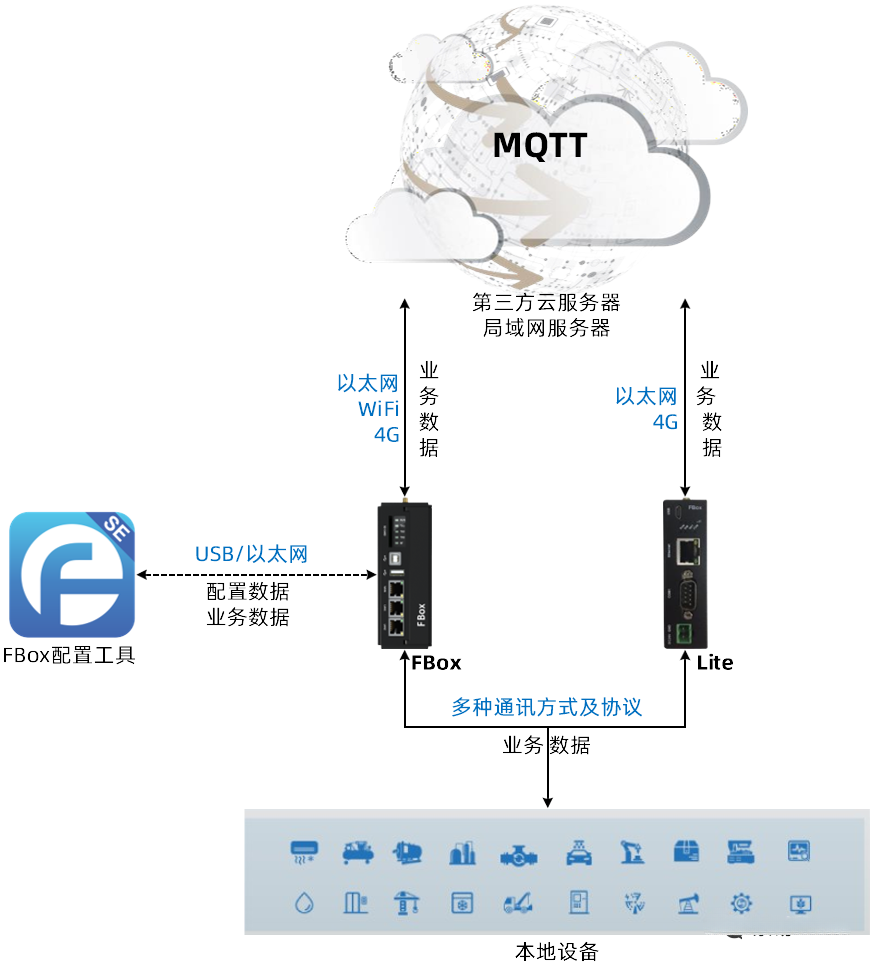
Three major lightweight features:
01 Single: Stand-alone client software that does not rely heavily on the Internet.
02 Simple: Easy to operate, templates can be sent with one click, and data can be uploaded to the cloud quickly.
03 Succinct: Simple interface, no server burden, no need to worry about operation and maintenance.
02Eight functions
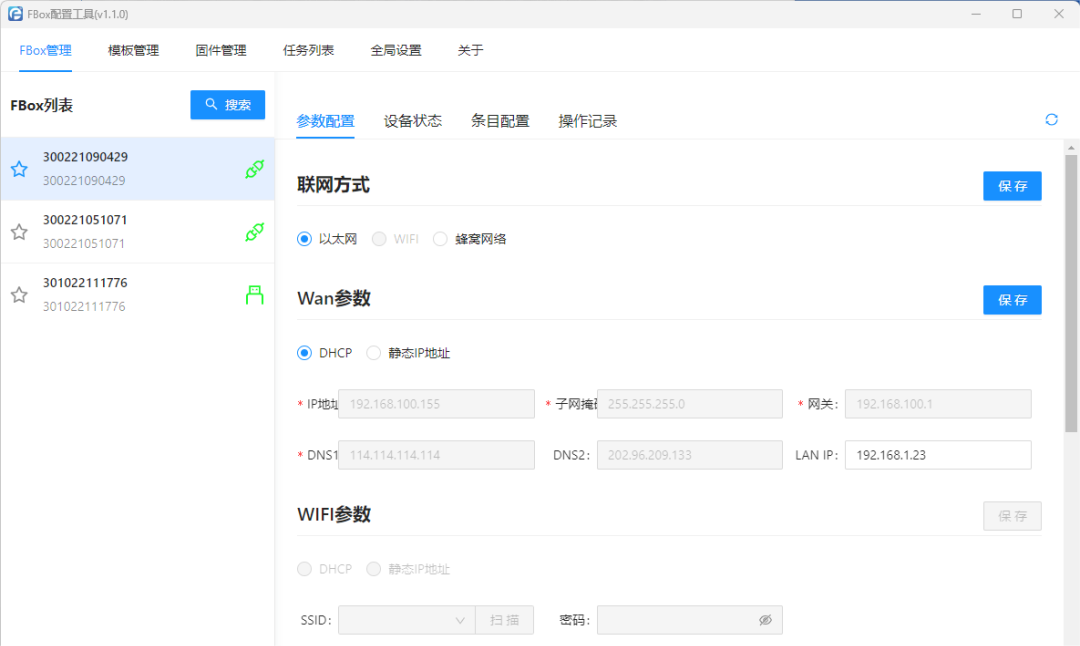
Software interface
Eight highlights
01 Mode Switching
Support offline/lightweight mode (FBox configuration tool software)
Switching between online mode (FlexManager software)
02 Batch Operation
Support batch firmware update
Support batch distribution of configuration templates
Support batch switching mode
03 Alarm Configuration
Support alarm configuration
04 Edge Computing
Support custom script operations
05 Data Monitoring
Support obtaining real-time information of monitoring points
Support obtaining device information
06 Basic Configuration
Support 350+ industrial protocols
Support template configuration
Support configuration of device parameters
07 Data forwarding
Support MQTT data forwarding
Support data migration to the cloud
08 Offline Configuration
Support LAN environment
Support offline configuration
03Applicable scenarios
1. Use in LAN environment
Scenario example: The box and the customer server are in the same LAN and cannot access the Internet, and business data needs to be sent to the server.
Recommended solution: The PC with the " Configuration Tool Software " installed and the box are in the same LAN. You can directly search for all the boxes in the current LAN to add them or add them through a fixed IP, and then send configuration templates (PLC driver configuration, variable configuration, alarm configuration, edge computing, data forwarding) to the box, update firmware, etc.
2. Focus on configuration and ignore management
Scenario example: The customer has his own platform, attaches importance to the integrity of IoT business data, and does not have too many requirements for the real-time nature of business data and the management of the box.
Recommended solution: Complete the configuration of the box through USB or Ethernet. The basic information of the box and the customer's business data are sent to the customer platform through MQTT. The MQTT message format is customized by the customer, and the server can subscribe to the MQTT message. The server needs to store data to ensure data integrity.
3. Reduce server costs
Scenario example: The customer does not want to use the Flexem public cloud. The cost of using privately deployed servers is high, and the customer already has servers on their own platform. They hope that we can provide a low-cost solution.
Recommended solution: The box can access the Internet, and the configuration is sent to the box through the "configuration tool software". The data collected by the box is published to the customer platform through MQTT, and the historical data is stored by the customer platform. The whole process does not require the participation of FlexHub.
4. Batch configuration or template configuration
Scenario example: The configuration of each box used by the customer is the same, and the customer hopes to configure the boxes in batches or use a template to complete the configuration of all boxes.
Recommended solution: First, configure the template on the software. The template format is json, which supports editing and can be used in the "configuration tool software" on other PCs and in FlexManager. If the boxes are in the same LAN, you can send configuration templates in batches with one click.
Functionality comparison with FlexManager
|
Features List |
Configuration Tools |
Manager |
|
Template Configuration |
support |
Not supported |
|
Alarm Configuration |
support |
support |
|
Alarm Management |
Not supported |
support |
|
Historical data storage |
MQTT Offline Cache |
support |
|
VPN pass-through |
Not supported |
support |
|
Considerable |
Not supported yet |
support |
|
Data connection |
MQTT |
API MQTT |
|
Whether to rely on the server |
No dependency |
Dependency on Hub |
|
LAN/offline use |
support |
Not supported |
|
Remote Operation |
VPN Network or LAN |
support |
|
Box Management |
Not supported |
support |
|
User Management |
Not supported |
support |

